Skip to content
SalesBoto

Integrations · Shopify

Live

What it reads and writes on your Shopify store

SalesBoto reads your Shopify store, prepares changes, and writes only the ones you approve: discounts, product copy and SEO fields, alt text, collection copy, clearance coupons. Here is the whole list, the two ways to connect, and what happens on the day you do.

Nothing is written to your store without your approval.

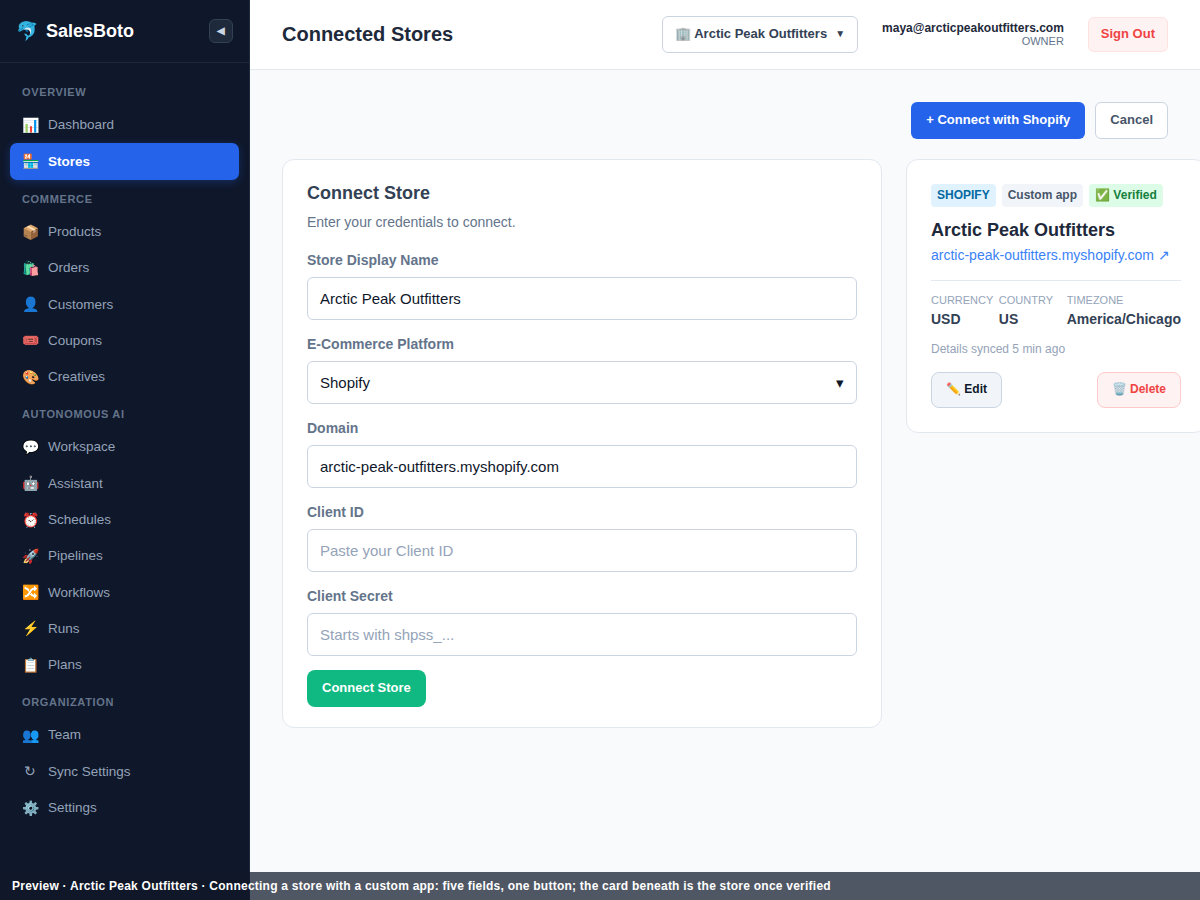
The connect-your-store screen with fields for the store name, domain, client ID and client secret from a custom app, and a Connect Store button.
Preview

Reads

What it reads from Shopify

Everything in this table is read when you connect and kept current afterwards. Reading never changes anything in your admin.

It readsSo that it can
Products and variantsFind thin descriptions, empty meta titles and descriptions, blank alt text; know which variants a discount reaches.
Costs (cost per item)Tell whether a discount would sell a variant below cost. A blank cost stays blank; it's never guessed and never treated as zero.
InventoryScore slow and dead stock, and check that stock is in scope before an audit runs.
OrdersWork out sales velocity and sell-through for the dead-stock skill.
CustomersRead alongside your orders. Today no skill changes a customer record, and nothing reaches a customer without your approval.
Discounts and couponsAudit every live discount against its rules, age, scope and cost, and link a discount to a creative pack.

Changes

What it writes to Shopify, and only after you approve

Every row in this table waits for your yes. There is no other kind of write.

It writesThe skill that prepares itWhen
A discount's percentage, end date, minimum subtotal, usage limit, or once-per-customer setting; or deactivating an old discountDiscount auditAfter approval
Product description, meta title and meta descriptionCatalog copyAfter approval
Image alt textCatalog copyAfter approval
Collection descriptionCatalog copyAfter approval
Clearance offers and discount codesDead stockAfter approval

Today it does not write product prices or compare-at prices, stock quantities, orders or customer records; no skill is written to touch your theme, your checkout or your apps. Creative packs are saved to your workspace's library, not to Shopify. A proposal you discard never leaves your workspace.

Connecting

Two ways to connect, one of them ready today

In use today

A custom app you create in your admin.

In your Shopify admin you create an app, give it the access listed above, and copy its client ID and secret into SalesBoto. That's the connection, and it takes a few minutes. The credentials are stored encrypted. If you delete the app in your admin, the connection stops and the store shows as disconnected.

Step-by-step: creating the custom app →
Awaiting Shopify verification

The public app.

One button, "Connect with Shopify". You approve the install on Shopify's screen and paste nothing. It's built and is awaiting verification by Shopify, so it isn't listed anywhere and there's no badge on this page.

Not listed. The custom app is the way to connect today.

Day one

What happens the moment you connect

  1. 1

    It reads your store.

    Catalog, variants, costs, inventory, orders, customers, discounts and coupons. Nothing in your admin changes, and you can watch the count climb in your workspace.

  2. 2

    It checks your store is ready.

    Before a skill runs, it checks what it needs: that product and cost data is fresh, that inventory is in scope, that your brand identity is set up for creative work. If something's missing, it tells you what, in the workspace, before it starts.

  3. 3

    It runs the first audit for your review.

    Pick the discount audit or the catalog scan, or set the morning shift for 8:00 in your timezone and let it run tomorrow. The first shift reads, proposes, and waits. The first change to your store happens when you approve one.

Arctic Peak Outfitters, an outdoor-apparel store in Austin, Texas

Leaving

What happens when you disconnect

You can disconnect from Shopify's side at any time, without asking us: delete the custom app in your admin, or uninstall the public app. The moment you do, SalesBoto can't read or write, and the store shows as disconnected in your workspace.

Disconnecting changes nothing in your admin. The discount you approved at 15% stays at 15%. The descriptions you approved stay live. They're your store's records, made with your approval, and they're still in the record with your name on them.

Questions Shopify owners ask

Is it in the Shopify App Store?+

Not yet. The public app is built and awaiting Shopify's verification, and there's no badge here because there's no listing. Today you connect with a custom app you create in your admin, which takes a few minutes and is walked through step by step in the help center.

Does connecting change anything in my store?+

No. Connecting lets the employee read your store. The first write to your admin happens when a skill has prepared a change and you've approved it, and not before. A read-only audit stays read-only from start to finish.

What if I change something in Shopify while it's preparing a change?+

Every skill checks how fresh its view of your store is before it runs. If you changed a discount in your admin last night, the morning audit proposes against the new value, not the old one.

What access does it ask for, and why?+

It reads products, variants, costs, inventory, orders, customers, discounts and coupons, and writes discounts, product copy and SEO fields, alt text, collection copy and clearance coupons. Every item in that list is tied to a skill on this page. With a custom app, you grant the access yourself in your admin, so you can see exactly what you're giving.

Will shoppers notice it?+

No. It works through your admin, never your storefront, so shoppers never feel it. Your theme and checkout are never touched; the employee has no path to them.

Does it need my costs filled in?+

For the discount audit, yes, per product, or it can't tell whether a discount sells below cost. It reads Shopify's cost-per-item field. Any product without a cost is treated as unknown, never as zero, and discounts on it are flagged for you rather than corrected. The catalog and dead-stock skills work without costs; the dead-stock skill shows cash tied up only where a cost exists.

Connect your store. Nothing changes until you approve it.

A custom app takes a few minutes to create; the first audit runs read-only.

Nothing is written to your store without your approval.